Developers
 
SDK Features
SDK Details
Download the SDK
SDK Licensing/Purchasing
Raster/Elevation Import Plugin - Import Custom Formats
Raster/Elevation Export Plugin - Export Custom Formats
External Control Interface - Allows Zooming, Panning, and Symbol Display
3D Viewer Source - Allows Customization of Global Mapper 3D Viewer
SDK Features Top
 

The Global Mapper SDK provides a Windows DLL which allows you to include much of the functionality of Global Mapper within your own applications. Some of the available features are described below.

  • Load any number of layers from almost all of the formats supported by Global Mapper. This includes nearly all imagery, elevation, and vector data formats.
  • Load USGS topographic maps and aerial imagery directly from the TerraServer. This allows your application to easily add access to the complete collection of U.S. topographic maps (DRGs), 1-meter grayscale satellite imagery (DOQs), and high resolution color urban area imagery.
  • Draw loaded layers to your own device context, allowing Global Mapper-style rendering in your own application. You can draw any specified portion of the loaded data.
  • Track a connected serial or Garmin USB GPS device in real-time.
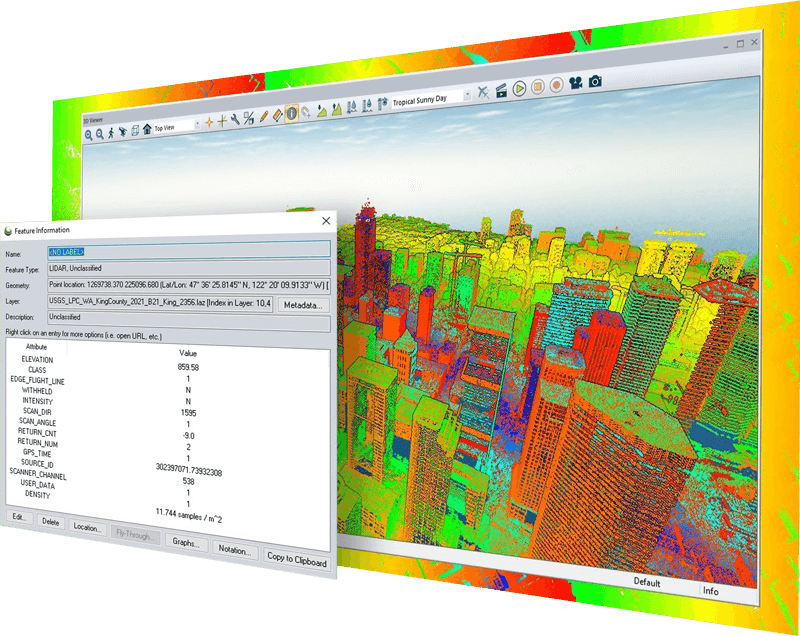
  • Display the Global Mapper 3D view window with loaded terrain and other data displayed.
  • Retrieve the color at any location from loaded raster and elevation layers.
  • Retrieve the elevation at any location from loaded elevation layers.
  • Get information about loaded layers, including projection/datum, bounding rectangle, description, ground control points, pixel size, etc.
  • Generate contour lines from loaded elevation grid layers.
  • Perform view shed analysis using loaded elevation grid layers as well as vector data (areas, lines, and points) with elevation values associated with them.
  • Calculate cut-and-fill volumes along a given line or within an area.
  • Reproject loaded data to a user-specified projection/datum.
  • Load imagery that has not been georeferenced by providing ground control points and projection, the DLL will perform the rectification.
  • Auto-clip the collar off of USGS DRGs.
  • Export loaded layers to several of the export formats supported by Global Mapper, such as GeoTIFF, JPG, Shapefile, KML, DXF, ECW, BMP, and PNG.
  • Export an offscreen bitmap to a GeoTIFF, JPG, or PNG file.
  • Re-project coordinates from one projection/datum to another projection/datum.
  • Modify the drawing style and font of all loaded vector data, including your own custom vector layers.
  • Perform a position-based search of loaded vector data (similar to the Feature Info tool in Global Mapper).
SDK Details Top
 

The Global Mapper DLL is a standard Windows DLL. As a standard Windows DLL, the Global Mapper DLL can be called from just about any programming language on a Windows platform, including Visual C++, Visual Basic, Visual C#, and Java with JNI. Samples for C++, C#, and Visual Basic are provided below as well as the C language header files and function reference.

Download the SDK Top
 

Click here to download the SDK for evaluation (the SDK is about 18MB in size). Upon request, we can provide an expiring registration file to allow you to try out the SDK for a few weeks prior to purchasing permanent licenses.

SDK Licensing/Purchasing Top
 

Purchasing the Global Mapper SDK entitles one developer to work with the Global Mapper SDK to develop custom applications. An additional DLL license must be purchased for each Global Mapper DLL that is distributed. Unlimited distribution licenses may also be available in some situations upon request. Special licensing is available for use of the SDK DLL in a server-side application that is accessed by users over a network.

Pricing for the SDK is fixed and provided below. The pricing for additional DLL licenses is negotiable and will be no higher than $139 US per DLL distributed. The actual cost per DLL distributed will vary depending on how the DLL will be used in the product being distributed. Products that directly compete with Global Mapper will be charged a higher price, while those that do not will be charged a potentially much lower price per DLL. Please contact us at support@globalmapper.com to discuss any potential projects which you'd like to use the Global Mapper DLL in and we can give you more specific pricing.

Payment processing for the Global Mapper SDK is provided by RegNow.com. RegNow.com offers secure payment options using most major credit cards as well as personal or company checks, PayPal, money orders, invoice/purchase order, and wire transfer. RegNow.com accepts online payments as well as payments via phone at 1-877-353-7297 (toll free in the US) or +1-952-646-5331. When placing a phone order, indicate that you wish to purchase product 16048-3 (Global Mapper SDK Developer License) or 16048-4 (Global Mapper SDK Distribution License).

 
Product
Price  
Global Mapper SDK
$999 US
Global Mapper DLL License Maximum of $139 US per license (see above)
 

Upon purchase of the SDK, instructions for downloading the SDK will be provided. Optionally, a CD containing the SDK can be mailed to the address provided during the order process. In addition, a single registration key file will be provided for the single DLL development license included with the SDK purchase.

When additional DLL development and/or distribution licenses are purchased, a separate registration key file (to be distributed with the DLL) will be provided for each additional license purchased.

Raster/Elevation Import Plugin Top
 

Global Mapper supports loading of raster and gridded elevation data through user-supplied import plugins. These plugins are Windows DLLs. See the download link below for more details.

Once loaded, these imported layers can be used just like any other natively supported layer. This allows advanced users to provide support for their own custom/proprietary formats without needing to provide format information to Global Mapper or wait for us to be able to implement the format.

CLICK HERE TO DOWNLOAD RASTER IMPORT PLUGIN API
Raster/Elevation Export Plugin Top
 

Global Mapper supports exporting any loaded data to raster and gridded elevation data formats through user-supplied export plugins. These plugins are Windows DLLs. See the download link below for more details.

This functionality allows advanced users to provide support for exporting data to their own custom/proprietary formats without needing to provide format information to Global Mapper or wait for us to be able to implement the format.

CLICK HERE TO DOWNLOAD RASTER EXPORT PLUGIN API
External Control Interface Top
 

Global Mapper supports allowing external applications to control the view window bounds displayed and to also display point symbols and text at user-specified locations on the main map display. This is accomplished through the use of WM_COPYDATA messages to pass data between Global Mapper and the external application.

The structure definitions as well as sample C++ code for controlling Global Mapper are provided in the download below.

CLICK HERE TO DOWNLOAD EXTERNAL CONTROL API
3D Viewer Source Top
 

We offer the source code for the OpenGL-based 3D viewer used in Global Mapper for free for anyone that wants to modify to add support for their own functionality to the 3D viewer. You can download the 3D viewer source from the link below and build it using Visual C++ .NET 2003 (or later). The build results in the creation of a new ExternalViewerIntf.dll file that you can replace the existing one with to try out your new 3D viewer functionality.

If the functionality that you want to add to the 3D viewer requires extra hooks into the Global Mapper application, let us know and we me may be able to add those. If you add something that you think that the entire community might enjoy and want to share it, feel free to email us as well and we may be able to update the shared 3D viewer code base to support your changes.

CLICK HERE TO DOWNLOAD 3D VIEWER SOURCE